

A coding agent can change twelve files in two minutes and still leave you with an hour of cleanup. The speed is useful: AI coding tools can trace dependencies, write repetitive code, run tests, and fix errors without making you hunt through the repository by hand.
But fast edits are only valuable when the agent understands what else the change might break. A patch can pass the obvious test while missing an older API call, a second configuration file, or an edge case hidden three folders away.
That is where Claude Code vs Cursor becomes a serious comparison. Both can explore a codebase, edit several files, run commands, and use Claude models. Claude Code takes an agent-first approach, while Cursor builds the agent into the editing experience.
In this Claude Code vs Cursor review, we compare which one reaches working, review-ready code with fewer corrections and less developer supervision.
Which is better in Claude Code vs Cursor? Our published reviews give Claude Code a slight overall edge, scoring it 8.8 compared with Cursor’s 8.4. Claude Code is our stronger choice for substantial engineering tasks, while Cursor remains the better fit for developers who prioritize autocomplete, inline editing, and visual review inside the editor.
The two tools now overlap heavily, but they still place the developer in different parts of the workflow.
| Area | Claude Code | Cursor |
| Where it runs | Terminal, VS Code, JetBrains, desktop and web | Cursor editor, CLI, browser and cloud agents |
| Editing | Multi-file edits with diff review | Tab autocomplete, inline edits and visual review |
| Agent execution | Local and remote sessions, subagents and agent teams | Local agents, cloud agents, subagents and automations |
| Model choice | Claude models; options vary by provider | Models from Anthropic, OpenAI, Google, xAI and Cursor |
| Repository search | Search tools, project instructions and subagents | Instant Grep, Rules and Explore subagents |
| Starting price | Claude Pro: $20/month | Hobby: free; Pro: $20/month |
| Main limitation | Long sessions can lose earlier details; vague tasks and loose permissions increase mistakes and usage. | Heavy agent and premium-model use can raise costs |
CursorBench compares models running inside Cursor, rather than Cursor against Claude Code. We will use task-level evidence when judging the products themselves.
These labels explain where the tools started. They no longer show everything the tools can do.
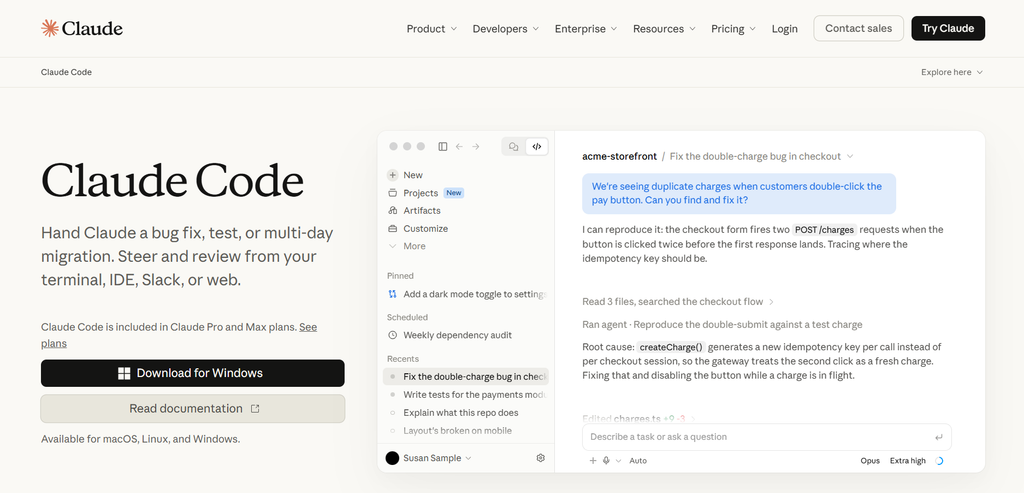
Claude Code started as a terminal agent. You describe the job, and it can inspect files, edit code, run commands, execute tests, and respond to errors. This works well when you want to hand over a complete task while staying inside your existing development setup.
Claude Code now also runs through extensions for VS Code and JetBrains, as well as Anthropic’s desktop and web interfaces. You do not have to abandon your preferred editor to use it.

Cursor began as an AI-native code editor. Its autocomplete, inline editing, chat, diffs, and agent controls sit beside the code, making it easy to move between writing code yourself and delegating a task.
Cursor has since expanded beyond the editor. It offers a CLI, cloud agents, background work, and automations. The main difference is still the centre of the experience: Claude Code starts with the agent, while Cursor starts with the editor.
A coding agent must find every file affected by a change. Editing the first match is easy. Finding an old caller, a second configuration file, and the correct tests is where repository work becomes difficult.
Claude Code can read a repository’s CLAUDE.md file before working. Teams can use this file to explain project structure, commands, coding rules, and files the agent should avoid.
The agent can search filenames and code, follow imports, inspect references, and assign parts of a larger investigation to subagents. This gives it a clear way to explore a repository before editing it.
Cursor uses Instant Grep for fast local code search. Rules can store project instructions, while Explore subagents can trace unfamiliar code without filling the main agent’s context with every search result.
Cursor also supports workspaces with several repository roots during local use. Its cloud agents currently do not support multi-root workspaces, which matters when one change crosses separate repositories.
Our published reviews support both tools for multi-file work. Claude Code stands out for complex refactors, migrations, and codebase analysis. Cursor combines repository search and multi-file agents with visual review inside the editor. Both need clear instructions and tests to catch changes that break existing behaviour.
Autonomy matters when an agent hits an unclear requirement, a failing test, or a risky command.
Claude Code can inspect a task in Plan Mode before editing. It asks permission before sensitive commands and can divide larger jobs between subagents. If the work goes off course, you can reject changes, restore a checkpoint, or narrow the instruction.
Our Claude Code review found its approach deliberate on complex refactors, migrations, and debugging tasks. Plan Mode lets developers review the proposed approach before editing begins. However, vague instructions can lead to large, unnecessary changes, and long sessions can lose earlier context. Clear requirements, restricted permissions, and a final diff review remain essential.
Planning does not guarantee a correct implementation. Our review notes that long sessions can lose important details as earlier context is compacted. Developers still need to define the task clearly, restrict permissions, and inspect the final diff.
Cursor’s local agents edit files, run commands, and respond to failures inside the editor. Cloud agents can work remotely and return a branch for review.
Our Cursor review found it fast at implementation, refactoring, and debugging. Its main weakness is scope: a poorly defined instruction can spread one incorrect assumption across several files. Naming the affected files, required tests, and changes to avoid makes its output easier to verify.
Between larger tasks, developers still need to rename variables, adjust conditions, and fix a few lines quickly.
Cursor feels faster here. Tab predicts the next edit, while inline editing lets you describe a change beside selected code. Suggestions appear as diffs, so you can accept one block, reject another, or undo the edit without losing the rest of your work.
Claude Code feels more deliberate. You describe the change, let the agent edit the file, and review its diff in the terminal or supported editor. Checkpoints also give you a way back when a request produces the wrong result.
For quick changes made while typing, Cursor is smoother. Claude Code fits targeted edits that deserve a short review before acceptance, especially when a small request may touch more than one file.
Model access checked on October 6, 2026.
| Tool | Models Available |
| Claude Code | Claude Fable 5.1, Opus 5.5, Sonnet 5.5 and Haiku 4.5 |
| Cursor | Claude models; GPT-5.6 Sol, Terra and Luna; Gemini 3.1 Pro and 3.8 Flash; Grok 4.5–4.7; Composer 2.5; and others |
Claude Code stays within Anthropic’s model family. However, shortcuts such as opus and sonnet can point to different model versions on different cloud providers. Check the model that actually loads before comparing results.
Cursor offers models from Anthropic, OpenAI, Google, xAI and Cursor itself.
Running Claude Opus 5.5 in both tools will not guarantee the same result. Each product uses different instructions, search tools, context rules, permissions and agent steps. The model handles the reasoning, but the coding tool controls which files it sees and how it checks its work.
If choosing your own model provider matters more than having a bundled subscription, read our Cline review. It covers an open-source agent with bring-your-own-model access, along with the API costs you need to monitor.
The subscription price is only the starting point in Claude Code vs Cursor. Both tools place limits on included model use.
| Plan Level | Claude Code | Cursor |
| Free | Claude Code not included | Hobby: $0, with limited usage |
| Standard individual | Pro: $20/month or approximately $17/month billed annually | Pro: $20/month or $16/month billed annually |
| Higher-use individual | Max 5x: $100/month | Pro+: $60/month or $48/month billed annually |
| Highest individual | Max 20x: $200/month | Ultra: $200/month or $160/month billed annually |
| Team standard seat | $25/seat/month or $20 billed annually | Teams Standard: from $40/user/month |
| Team premium seat | $125/seat/month or $100 billed annually | Not listed in our published review |
| Enterprise | From $20/seat/month billed annually, with usage billed separately | Custom pricing |
Claude Pro includes Claude Code, but coding sessions and regular Claude use share the account’s allowance. Paid users can buy usage credits after reaching a limit. Fable 5.1 may require these credits instead of using the normal Pro allowance.
Cursor Pro includes unlimited Tab completions and two model pools. Cursor models use one pool. Third-party models such as Claude and GPT use another at their API rates. On-demand billing lets you continue after the included amount runs out.
Long sessions repeatedly send repository context to the model. More expensive models use the allowance faster. Running several agents at once also means paying for several active tasks.
Cursor says daily agent users typically reach 60–100 in total monthly usage. Power users running several agents or automations often pass $200. Claude Max provides a larger fixed allowance, but session and weekly limits still apply. API use, Fable requests and extra usage credits can push the final cost above the subscription price.
The better choice depends on how your code reaches production.
Cursor fits developers who spend the day inside a VS Code-style editor. Its free plan also works for occasional use. Claude Code suits developers who prefer the terminal or want to add an agent to their current editor. Claude Pro costs less when paid annually, but coding shares its allowance with other Claude use.
If you want to build a prototype without configuring a local environment, our Replit Agent review looks at browser-based app generation and deployment. Its billing and reliability limits matter once the project grows beyond a simple MVP.
Claude Code offers shared project instructions, managed settings, permissions and organization-wide skills. Claude Team also lets companies mix standard and premium seats.
Cursor provides centralized billing, shared rules, team skills, usage reports, privacy controls and SSO. Cloud agents and automations can make remote work more repeatable, although parallel jobs may raise costs quickly.
Neither tool wins for every team. Choose the controls your developers will maintain and your leads can enforce.
For teams with strict deployment requirements, our Tabnine review examines self-hosted and air-gapped options, plus the trade-offs in capability and cost.
If your team already works in Google Cloud, our Gemini Code Assist review covers project context, enterprise repository customization, and managed access.
The strongest choice in Claude Code vs Cursor depends on the work you repeat most often.
| Your Main Use | Our Pick | Why |
| Small edits and autocomplete | Cursor | Tab and inline editing stay beside the code |
| Multi-file changes | Claude Code | Our review highlights its strength in refactors, migrations, and multi-step debugging. Cursor also supports multi-file work. |
| Terminal workflows | Claude Code | It fits existing shells, scripts and command-line tools |
| Model flexibility | Cursor | It offers Claude, GPT, Gemini, Grok and Cursor models |
| Cloud tasks | Cursor | Cloud agents can continue work remotely |
| Team controls | Depends | Both suit teams with clear repository conventions, automated tests, code review, and managed permissions. |
Choose Claude Code when you want to hand over a defined repository task and review the result. Choose Cursor when you want AI involved while you write, edit and check code.
Our Claude Code alternatives guide covers other terminal and agent workflows. You can also check our Cursor alternatives guide to compare more Claude Code competitors without turning this review into another long tools list.
For smaller web projects with a live browser preview, read our Bolt.new review. It covers direct code access, deployment, and how token use rises as the project grows.
For existing AWS workflows or Java modernization work, our Amazon Q Developer review covers those specialist strengths. Check its support-deadline caveat before considering it for a new long-term setup.
Want to compare the features, scores and test findings directly? Open the AI Suggestions Claude Code vs Cursor comparison before choosing a plan.
Claude Code is better for developers who want to delegate a defined repository task from the terminal or their current editor. Cursor is better for developers who want autocomplete, inline editing, visual diffs, and agents in the same workspace. The stronger choice depends on whether you mainly hand off tasks or work beside the AI throughout the day.
Claude Code can replace Cursor if you already have an editor you like and mainly need an agent for larger coding tasks. It now works through the terminal, IDE extensions, desktop, and web. However, it does not copy Cursor’s complete editing experience. Developers who rely heavily on Tab completion and inline changes may still prefer Cursor.
Yes. Cursor is a strong Cursor alternative to Claude Code for developers who want more model choice and closer control while editing. It can also handle larger agent tasks through local and cloud agents. However, moving to Cursor means adopting its editor for the full experience, while Claude Code fits more easily into an existing terminal and IDE setup.
Claude Code is our pick when a large repository task needs planning, careful command execution, and controlled changes across several files. Cursor remains strong when developers need fast code search and visual review. Repository size alone should not decide the result. Project instructions, workspace structure, generated files, and test coverage also affect how well each agent performs.
Cursor Pro Plus costs $60 per month, while Claude Max starts at $100. That makes Cursor’s higher-use entry point cheaper. However, Cursor can add on-demand charges when model allowances run out. Claude Max provides a larger fixed allowance but still has session and weekly limits. Heavy users should compare a full month’s usage rather than the advertised starting price.